
label、fieldset、legend、错误提示与帮助文本
是什么与为什么需要
label 为控件提供可访问名称并扩大点击区域;fieldset/legend 为相关控件建立组名;帮助文本说明格式,错误提示说明问题与修正方法。这些关系必须能被程序确定,不能只靠位置或颜色。
flowchart LR
    A["可见 label"] --> B["控件可访问名称"]
    C["fieldset + legend"] --> D["控件组名称"]
    E["帮助文本"] -->|"aria-describedby"| F["可访问描述"]
    G["错误文本"] -->|"aria-describedby"| F
H["aria-invalid"] --> I["当前值是否无效"]名称回答“这个控件是什么”,描述回答“怎样填写或哪里出错”,状态回答“当前是否无效”。aria-describedby 不会把描述变成名称,也不会显示或隐藏任何内容。
名称、组名、描述与无效状态
<fieldset>
  <legend>通知方式(必选)</legend>
  <label><input type="radio" name="notify" value="email" required> 邮件</label>
  <label><input type="radio" name="notify" value="sms"> 短信</label>
</fieldset>
<label for="username">用户名</label>
<input id="username" name="username" aria-describedby="username-help username-error" aria-invalid="true" required>
<p id="username-help">4–20 个字母或数字。</p>
<p id="username-error">用户名含空格,请删除空格。</p>显式 label 的 for 必须精确匹配唯一 id。错误出现后设置 aria-invalid="true",用 aria-describedby 关联说明;提交后提供错误摘要、指向字段的链接并把焦点移到合适位置。
提交后的错误顺序
- 服务端或客户端按同一业务规则获得字段错误。
- 在字段附近显示具体错误,说明问题与修正方法。
- 将错误元素 ID 加入控件
aria-describedby,并把aria-invalid设为true。 - 在表单顶部生成错误摘要,每项链接到对应控件。
- 把焦点移动到摘要标题或第一个无效字段,选择一种稳定策略并测试。
- 用户修正后清除错误文本、关联和无效状态;不要留下过时信息。
动态逐键校验要避免输入尚未完成就持续播报。更适合在提交、失焦或格式已足够明确时反馈,并允许用户完成输入。
placeholder、title、live region 与输入保留边界
不要仅用 placeholder、title 或图标代替可见 label。不要把整个复杂区域包进 label。aria-describedby 不控制视觉显示。动态错误可用 live region 通知,但避免每次输入都打断用户。服务端错误返回时保留非敏感输入。
必填说明与最小数据收集
必填状态应在 label/legend 文本中可理解;星号需解释。只收集完成任务所需字段可降低填写负担。
完整案例:带错误摘要的配送地址表单
输入要求用户选择配送方式并填写收件人、邮编。提交后服务端返回两个错误:收件人为空,邮编格式错误。页面必须同时提供字段附近错误和可键盘定位的错误摘要。
1. 初始 HTML
<form action="/checkout/address" method="post" novalidate>
  <div id="error-summary" tabindex="-1" hidden></div>

  <fieldset>
    <legend>配送方式(必选)</legend>
    <label><input type="radio" name="delivery" value="standard" required> 标准配送</label>
    <label><input type="radio" name="delivery" value="express"> 次日达</label>
  </fieldset>

  <label for="recipient">收件人</label>
  <input id="recipient" name="recipient" autocomplete="shipping name" required>
  <p id="recipient-help">请填写证件或门禁可识别的姓名。</p>
  <p id="recipient-error" hidden></p>

  <label for="postal-code">邮编</label>
  <input id="postal-code" name="postalCode" inputmode="numeric" autocomplete="shipping postal-code">
  <p id="postal-code-help">填写 6 位数字。</p>
  <p id="postal-code-error" hidden></p>

  <button type="submit">保存并继续</button>
</form>这里用 novalidate 是为了演示应用统一错误界面,不表示放弃校验。服务端始终执行最终规则。若项目使用浏览器原生气泡,可以移除 novalidate,但仍需处理服务端错误。
显式 label 的 for 与控件唯一 id 匹配。radio 使用包裹式 label,共享 name 形成一组;legend 提供组名。帮助文本目前尚未关联,下一步由脚本组合描述 ID。
2. 定义具体错误输入
const errors = {
  recipient: '请输入收件人姓名。',
  'postal-code': '邮编必须是 6 位数字。',
};键使用 DOM id,仅用于界面映射;真实 API 应返回稳定字段路径和错误码,不把任意服务端字符串直接插入 HTML。
3. 将错误关联到字段
const descriptionIds = {
  recipient: ['recipient-help', 'recipient-error'],
  'postal-code': ['postal-code-help', 'postal-code-error'],
};

for (const [fieldId, message] of Object.entries(errors)) {
  const field = document.getElementById(fieldId);
  const error = document.getElementById(`${fieldId}-error`);
  error.textContent = message;
  error.hidden = false;
  field.setAttribute('aria-invalid', 'true');
  field.setAttribute('aria-describedby', descriptionIds[fieldId].join(' '));
}Name 仍来自 label,Description 依次包含帮助和错误,Invalid 状态为 true。aria-describedby 中 ID 顺序表达期望组合,但实际播报细节受辅助技术影响。
4. 创建错误摘要
const summary = document.getElementById('error-summary');
const heading = document.createElement('h2');
heading.textContent = `表单中有 ${Object.keys(errors).length} 个错误`;

const list = document.createElement('ul');
for (const [fieldId, message] of Object.entries(errors)) {
  const item = document.createElement('li');
  const link = document.createElement('a');
  link.href = `#${fieldId}`;
  link.textContent = message;
  item.append(link);
  list.append(item);
}

summary.replaceChildren(heading, list);
summary.hidden = false;
summary.focus();使用 textContent 防止把错误文本当 HTML 执行。摘要容器 tabindex="-1" 可程序聚焦但不进入正常 Tab 序列。焦点移到摘要后,用户先获得错误数量,再通过链接定位字段。
片段链接对 input 的焦点行为存在实现差异,可在摘要链接 click 中显式 document.getElementById(fieldId).focus(),同时保留 href 作为无脚本导航语义。
5. 修正后的状态清理
字段通过验证后必须移除过时状态:
function clearFieldError(fieldId) {
  const field = document.getElementById(fieldId);
  const error = document.getElementById(`${fieldId}-error`);
  error.textContent = '';
  error.hidden = true;
  field.removeAttribute('aria-invalid');
  field.setAttribute('aria-describedby', `${fieldId}-help`);
}不能只把错误视觉隐藏而保留 aria-describedby,否则辅助技术仍可能读取旧错误。也不要在用户每输入一个字符时反复移动焦点或播报整个摘要。
6. 可观察输出
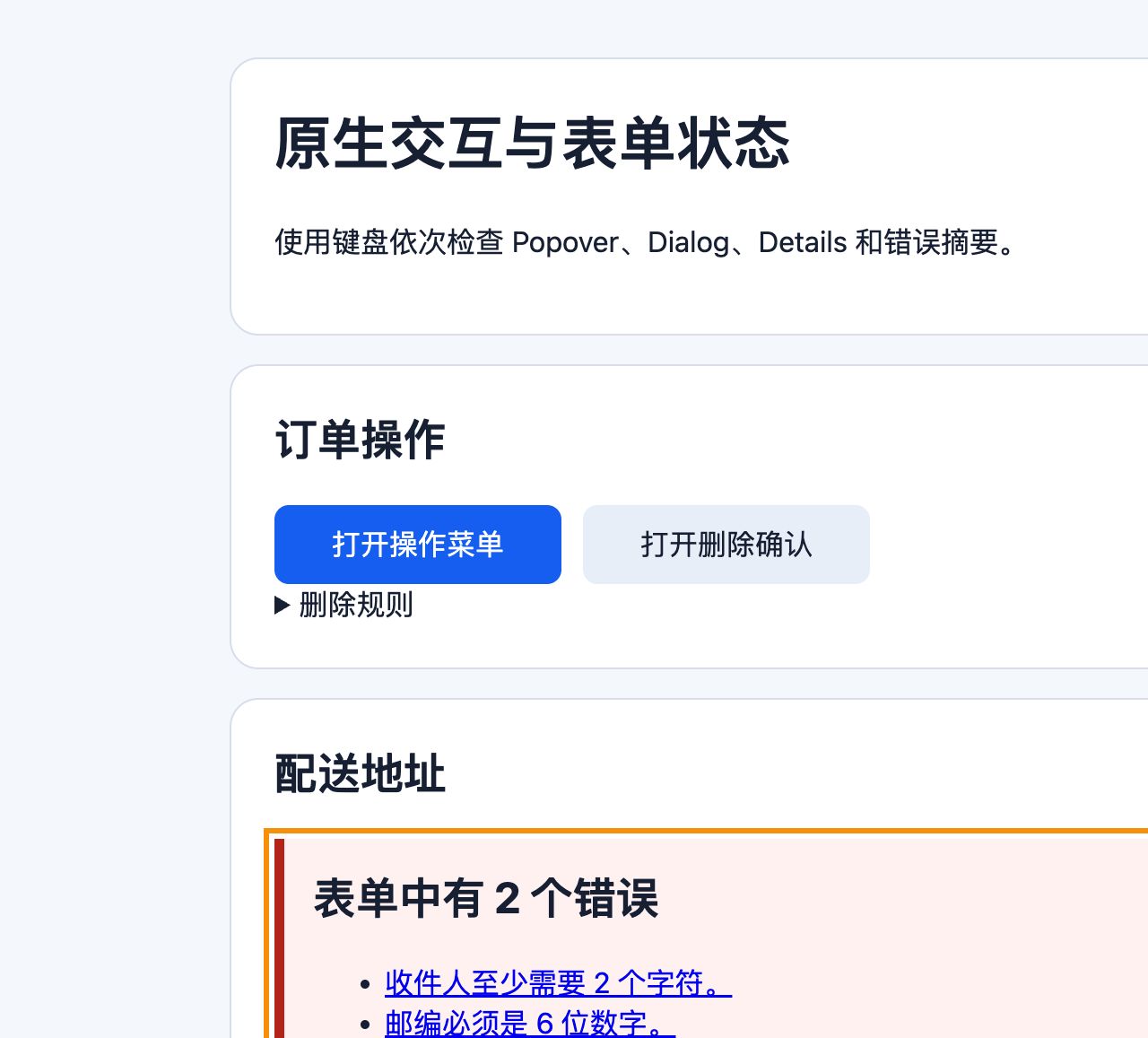
提交错误输入后,视觉上出现两个字段错误和顶部摘要;document.activeElement.id 为 error-summary;Accessibility 树中收件人 Name 为“收件人”,Description 包含帮助与错误,Invalid 为 true。
仓库中的 原生交互与表单状态 demo 可直接复现该错误状态。桌面视口提交空表单后,错误摘要包含 2 项并取得焦点:
390×844 窄屏下页面宽度与视口一致,没有横向溢出:
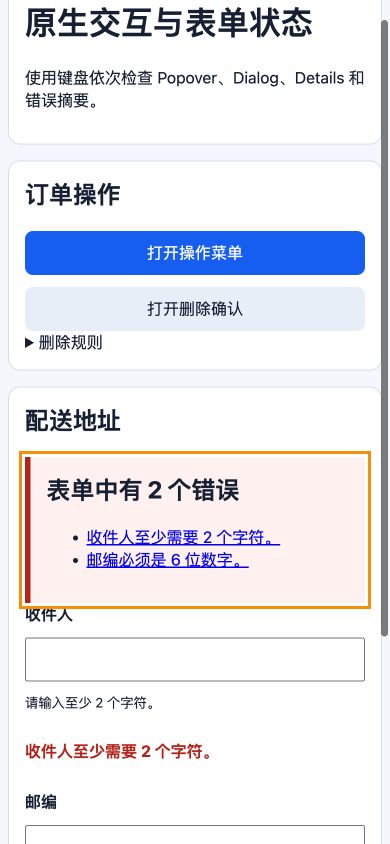
真实浏览器检查中 Console warning/error 为 0。截图只展示状态;字段名称、描述和无效状态仍需通过 demo 源码与 Accessibility 树验证。
修正收件人后调用清理函数,错误隐藏、描述只保留帮助、Invalid 恢复默认。邮编错误仍存在,摘要应重新生成而不是继续显示错误数 2。
7. 失败分支
只使用红色边框无法说明错误原因;placeholder 会在输入后消失且不是稳定标签;title 依赖 hover 并不能可靠替代可见 label;给每次键入都使用 role="alert" 会造成连续打断。
服务端返回页面时,如果把密码、证件号或支付数据回填,会扩大泄漏风险。只保留允许恢复的非敏感字段,并按业务要求处理地址等个人信息。
fieldset 被 CSS display: contents 或复杂重排影响时,要验证 legend 与 radio 组关系。纯视觉边框和标题不能替代 fieldset/legend 的程序化分组。
8. 验收练习
只用键盘提交空表单、从摘要逐项定位并修正。完成标准:点击 label 能聚焦或选择控件;Accessibility 树中的 Name、Description、Invalid 与界面同步;组名和字段名可见;错误不只靠颜色;摘要错误数实时准确;修正后移除旧关联;服务端返回错误时只保留允许的非敏感输入。
来源
- W3C WAI:Labeling controls — 访问日期:2026-07-17
- W3C WAI:Grouping controls — 访问日期:2026-07-17
- W3C WAI:Form instructions — 访问日期:2026-07-17
- W3C WAI:User notifications — 访问日期:2026-07-17